What Is LinkedIn Sales Navigator and Who Should Use It?
LinkedIn Sales Navigator is designed for one purpose: helping sales teams identify the right decision-makers and build more effective B2B sales conversations.
In practice, Sales Navigator is much more than an upgraded version of LinkedIn. It’s a sales intelligence platform that helps professionals work with buying signals instead of assumptions.
While standard LinkedIn shows profiles, Sales Navigator provides deeper insight into company changes, prospect activity, and professional relationships. Those signals help sales teams reach out when the timing actually makes business sense.
Technology alone, however, doesn’t generate pipeline.
Without a clearly defined Ideal Customer Profile (ICP) and a structured sales process, even the best features simply create more activity instead of more revenue.
Building a Prospect List with LinkedIn Sales Navigator
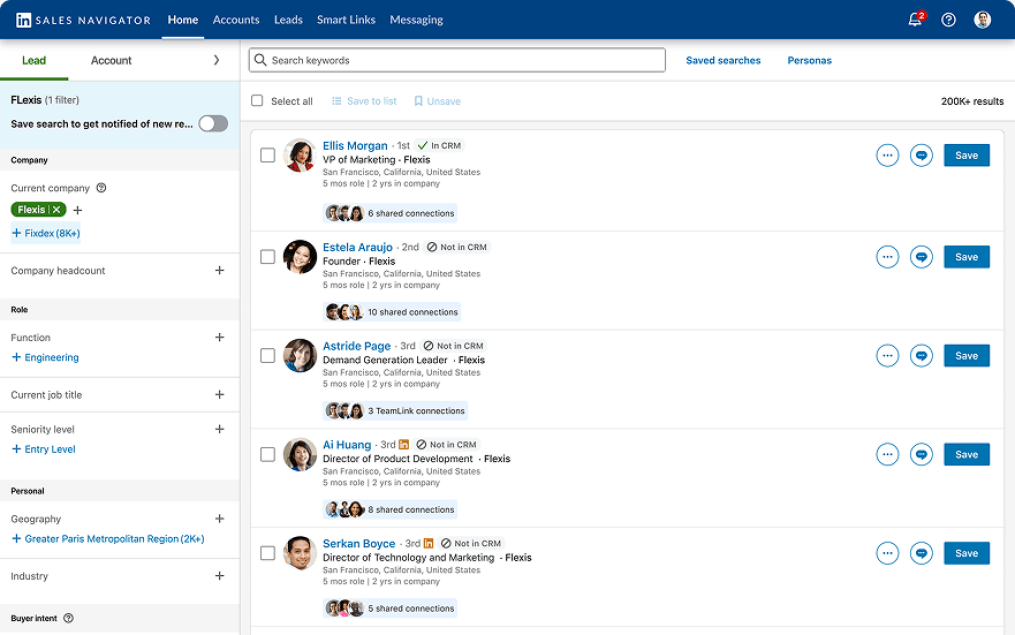
One of the biggest strengths of Sales Navigator is its advanced search functionality.
Rather than creating a simple contact list, sales teams can build highly targeted prospect databases by filtering companies and decision-makers based on multiple business criteria.
Filters include factors such as:
- Industry
- Company size
- Job title
- Geographic location
- Company activity
Instead of sending outreach to thousands of random contacts, sales representatives focus only on prospects who match their Ideal Customer Profile.
That changes outbound completely.
Better targeting leads to:
- Fewer outreach messages
- Higher response rates
- Faster sales conversations
Poor search criteria create the opposite effect.
If your prospect list includes people with no reason to buy, no amount of personalization will improve campaign performance.
LinkedIn InMail: When Does It Actually Work?
LinkedIn InMail allows you to contact people outside your existing network.
It’s one of Sales Navigator’s most valuable capabilities—and one of its most misused.
Many companies treat InMail as another cold outreach channel.
The result is predictable.
Decision-makers receive another generic sales pitch that looks almost identical to dozens of others.
Successful InMail campaigns begin with context.
High-performing messages usually:
- Reference a recent business event
- Connect with the prospect’s current situation
- Aim to start a conversation rather than immediately sell a product
InMail creates opportunities.
It doesn’t create interest on its own.
Without relevant timing and messaging, businesses simply spend credits without generating meaningful conversations.
Alerts and Real-Time Buying Signals
One feature that significantly changes outbound sales is Alerts.
Instead of reaching out randomly, sales teams receive notifications about events that often create natural reasons to start a conversation.
Examples include:
- Job changes
- Company updates
- Prospect activity on LinkedIn
Those signals allow sales representatives to contact buyers when something relevant has happened instead of relying entirely on cold outreach.
That approach typically results in:
- Higher reply rates
- Faster sales conversations
- Shorter sales cycles
Ignoring these signals removes one of Sales Navigator’s biggest competitive advantages.
Without Alerts, the platform becomes little more than a premium version of LinkedIn.
Can Sales Navigator Replace a CRM?
Some companies try to manage their entire sales process inside Sales Navigator.
That works—but only up to a point.
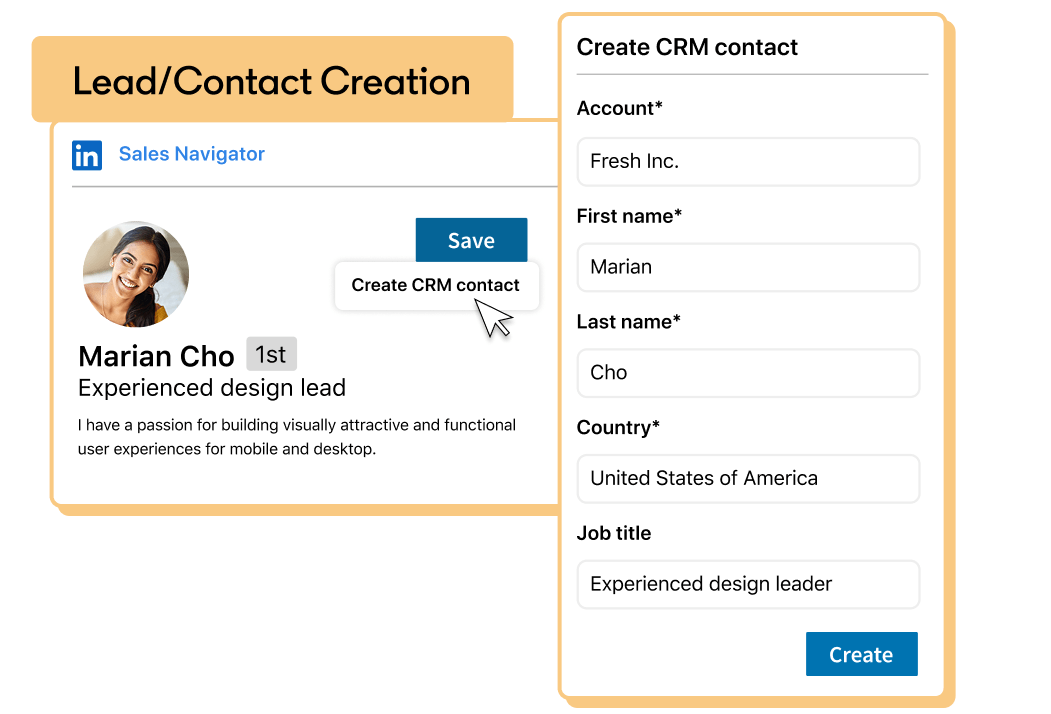
Sales Navigator is excellent for prospecting and relationship building. You can save leads, add notes, and track interactions before a sales opportunity enters your pipeline.
The limitations appear once deals become active.
Sales Navigator doesn’t provide:
- Pipeline management
- Deal stages
- Revenue forecasting
- Sales reporting
That’s why Sales Navigator should be viewed as the layer before your CRM—not as a replacement for one.
Trying to manage the entire sales process inside Sales Navigator eventually leads to poor visibility, inconsistent follow-up, and limited control over sales performance.
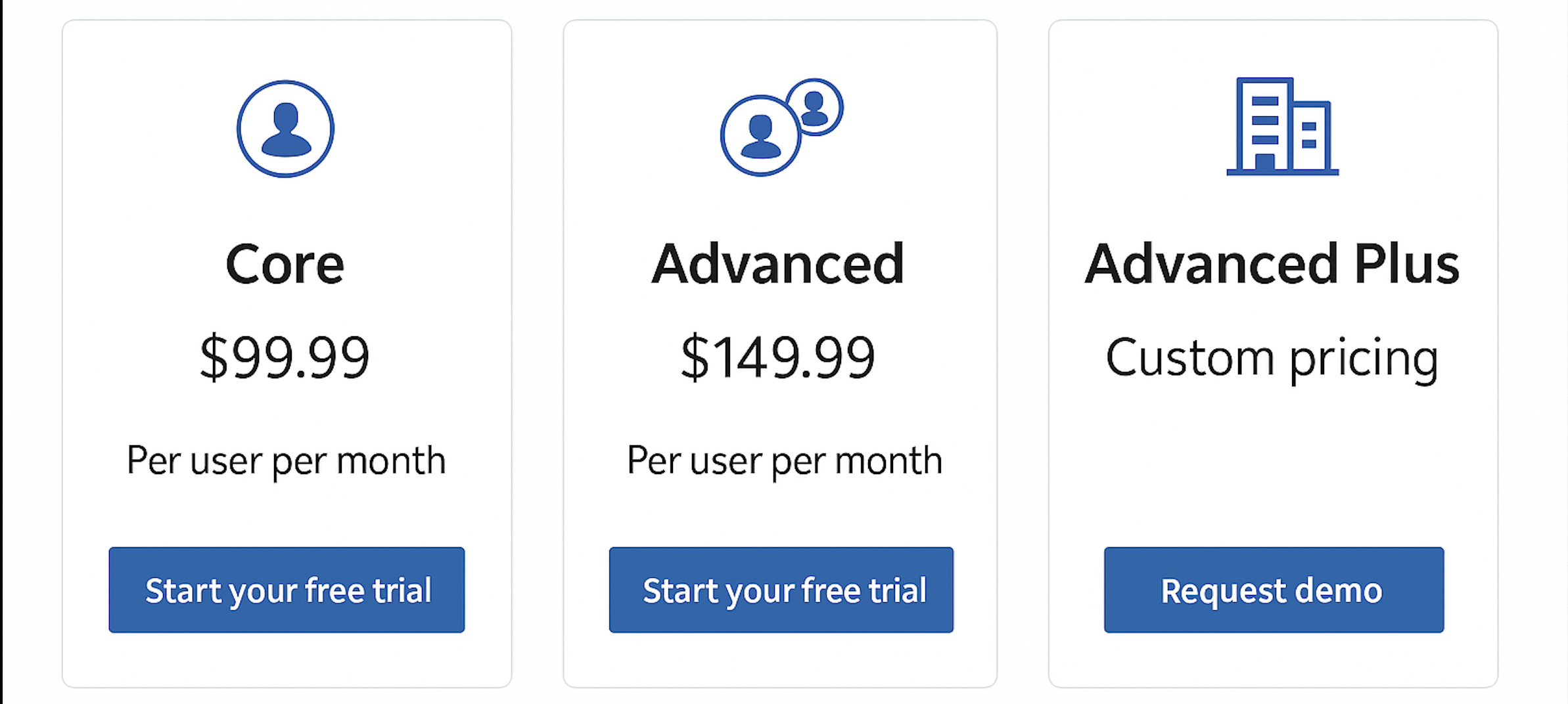
LinkedIn Sales Navigator Plans: Which One Makes Sense?
The different LinkedIn Sales Navigator plans aren’t simply collections of additional features.
They’re designed for different stages of sales maturity.
The right plan depends less on company size and more on how your sales team operates.
The real question isn’t:
“Which plan has the most features?”
It’s:
“Which plan supports our sales process?”
Sales Navigator Core
Sales Navigator Core includes everything an individual sales professional needs to begin outbound prospecting.
It provides:
- Advanced search filters
- Lead and account lists
- InMail
- Buying signals and Alerts
For solo sales professionals or small outbound teams, that’s often enough to generate qualified conversations.
Problems appear when multiple salespeople begin targeting the same market.
Without shared visibility:
- The same accounts get contacted multiple times.
- Valuable information stays with individual sales reps.
- Prospecting becomes increasingly difficult to coordinate.
At that point, the limitation isn’t prospecting.
It’s collaboration.
Sales Navigator Advanced
Sales Navigator Advanced introduces shared visibility across the sales team.
Instead of every salesperson managing a private list of prospects, the team works from a shared environment.
Benefits include:
- No duplicate outreach
- Shared lead ownership
- Better coordination across the sales organization
- Greater visibility into sales activity
This is often the point where outbound sales becomes scalable.
Without shared prospect management, growing the team usually increases activity—but not necessarily pipeline.
Sales Navigator Advanced Plus
Sales Navigator Advanced Plus is built for organizations managing outbound sales at scale.
Beyond prospecting features, it introduces capabilities such as:
- CRM integration
- ROI reporting
- Centralized license management
- Enterprise administration
These features become valuable only when a company already has a structured sales process.
Otherwise, businesses end up paying for functionality they don’t actually use.
Advanced Plus isn’t designed to fix a broken sales process.
It’s designed to optimize one that already works.
LinkedIn Sales Navigator Trial: How to Test It Properly
Many companies draw the wrong conclusions during the LinkedIn Sales Navigator trial simply because they test the platform without a clear plan.
When there’s no defined target audience, messaging, or success metric, it’s easy to assume the tool doesn’t work.
In reality, the issue usually lies in the sales process—not the software.
A proper trial should include:
- A clearly defined Ideal Customer Profile (ICP)
- A fixed number of target accounts and prospects
- Consistent outreach messaging
- Measurable response and meeting rates
If the trial doesn’t generate conversations, the first step isn’t replacing the tool.
It’s evaluating your targeting and messaging.
Sales Navigator exposes weaknesses in your outbound strategy.
It doesn’t fix them automatically.
How Much Does Sales Navigator Cost—and Is It Worth It?
The monthly subscription cost is rarely the deciding factor.
The real question is whether Sales Navigator improves pipeline generation.
Without accurate targeting, sales teams spend more time contacting prospects who were never likely to become customers.
With a well-defined process, Sales Navigator typically helps teams:
- Send fewer outreach messages
- Increase response rates
- Book meetings faster
The return on investment comes from improved efficiency—not simply from having access to more features.
Monthly vs. Annual Sales Navigator Subscription
A monthly subscription offers flexibility and is ideal for testing whether Sales Navigator fits your sales process.
An annual subscription encourages a different mindset.
Because the investment is larger, teams are more likely to integrate the platform into their daily workflow instead of treating it as another tool they occasionally use.
Ultimately, the subscription model matters far less than adoption.
Even the best plan creates little value if it isn’t embedded in the sales process.
TeamLink, TeamLink Extend, and Admin Center
As outbound teams grow, internal collaboration becomes increasingly important.
TeamLink helps sales representatives identify warm introductions through colleagues already connected with target accounts.
Instead of starting every conversation from scratch, salespeople can leverage existing relationships inside the organization.
TeamLink Extend expands that capability even further by incorporating trusted external networks, creating additional opportunities to reach decision-makers through mutual connections.
Admin Center gives sales leaders visibility into how the platform is being used across the organization, helping ensure licenses are actively supporting pipeline generation rather than sitting unused.
Ignoring these collaborative features often means leaving valuable business relationships untapped.
Enterprise License Management and Access Control
For larger organizations, license management becomes an operational issue rather than an administrative one.
Enterprise License Management allows companies to allocate Sales Navigator licenses where they create the greatest business impact.
Without centralized control, licenses often become distributed unevenly, reducing adoption while increasing software costs.
The objective isn’t simply managing users.
It’s ensuring every license contributes to measurable sales performance.
Advanced Features: ROI Reporting, Personas, and Sales Navigator Coach
Advanced capabilities become valuable once outbound sales is already running consistently.
ROI Reporting connects prospecting activity with pipeline performance, making it easier to understand which actions actually generate revenue.
Personas help teams organize target audiences and adapt messaging to different buyer groups.
Sales Navigator Coach supports onboarding and encourages better adoption across sales teams, helping representatives use the platform more effectively.
Companies that ignore these capabilities often pay for enterprise functionality while using only a fraction of its potential.
LinkedIn Premium vs. Sales Navigator
Although both products belong to LinkedIn, they serve very different purposes.
LinkedIn Premium provides additional networking and profile features.
Sales Navigator is designed specifically for sales teams.
The difference isn’t the number of features.
It’s the quality of sales intelligence.
Sales Navigator helps identify the right people, recognize buying signals, and prioritize outreach based on business context rather than guesswork.
For organizations focused on outbound sales, that difference directly impacts pipeline quality and conversion rates.
LinkedIn Sales Navigator vs. Other Sales Tools
LinkedIn Sales Navigator offers one major advantage over most sales tools: access to real-time professional data and business context.
Many external prospecting platforms provide larger databases and greater scale, but they often lack the up-to-date insights that make outreach more relevant.
The strongest outbound strategies combine both approaches.
A typical workflow looks like this:
- Use LinkedIn Sales Navigator to identify the right decision-makers.
- Use additional sales tools to scale outreach and enrich contact data.
- Manage the sales process inside a CRM.
No single platform can handle the entire outbound process on its own. Sales Navigator is most valuable when it becomes part of a broader sales technology stack.
Is LinkedIn Sales Navigator Worth It?
Sales Navigator delivers the greatest value when a business already knows:
- Who its ideal customers are
- Which decision-makers it needs to reach
- How its sales process works
Without those foundations, the platform simply creates more activity without generating better results.
Companies lacking a clear Ideal Customer Profile, structured outreach process, or data-driven prospecting strategy often conclude that Sales Navigator doesn’t work.
In reality, the tool simply highlights weaknesses that already existed.
When implemented correctly, Sales Navigator helps sales teams generate more qualified conversations while improving pipeline quality.
Using Sales Navigator Before the CRM
Sales Navigator performs best at the very beginning of the sales process.
Before prospects enter the CRM, sales representatives can:
- Save leads
- Organize accounts
- Add notes
- Track interactions
- Build context before the first conversation
This stage is often overlooked, yet it’s where Sales Navigator creates the greatest operational value.
Once a prospect becomes an active sales opportunity, however, the CRM should take over.
Managing deals, forecasting revenue, and tracking pipeline progress remain responsibilities that Sales Navigator wasn’t designed to handle.
Calendar Sync and Embedded Experiences
Sales Navigator becomes significantly more powerful when integrated into existing sales workflows.
Calendar Sync connects meetings, follow-ups, and contacts, making it much easier for sales representatives to maintain consistent communication.
The benefits include:
- Fewer missed follow-ups
- Better organization
- Stronger relationship management
Embedded Experiences extend Sales Navigator functionality directly into CRM platforms and other sales applications.
Instead of constantly switching between tools, sales teams can access LinkedIn insights within their existing workflow.
That reduces administrative work and helps maintain a more consistent sales process.
How Sales Navigator Fits into a Modern Sales Stack
Many organizations still treat their sales tools as separate systems.
The CRM stores opportunities.
Outbound software sends emails.
LinkedIn helps find prospects.
But none of them work together.
Sales Navigator helps connect those systems during the prospecting stage.
A modern workflow typically looks like this:
- Identify target accounts in Sales Navigator.
- Transfer qualified prospects into the CRM.
- Manage the opportunity throughout the sales pipeline.
Without this integration, sales representatives waste time moving between platforms, duplicating work, and losing valuable context.

Lead Quality and Prospect Data
Prospecting isn’t simply about collecting contact information.
It’s about collecting the right information.
Sales Navigator provides access to current professional data, allowing sales teams to build prospect lists based on real buying potential rather than outdated databases.
Higher-quality data leads to:
- Fewer irrelevant prospects
- More qualified conversations
- Better conversion rates
Poor data quality creates problems that no outreach strategy can solve.
Even excellent messaging can’t compensate for targeting the wrong people.
Does Sales Navigator Speed Up Prospecting?
In most cases, yes.
Sales Navigator shortens the time between identifying a prospect and starting a relevant business conversation.
It does so by combining three critical elements:
- Better prospect filtering
- Rich business context
- Real-time buying signals
That removes one of the biggest weaknesses of traditional cold outreach.
Instead of contacting prospects for no particular reason, sales teams reach out when something meaningful has changed.
The result is outreach that feels timely rather than random.
Common Sales Navigator Mistakes
Most problems associated with Sales Navigator aren’t caused by the platform itself.
They’re caused by how it’s used.
The biggest misconception is believing Sales Navigator automatically generates pipeline.
It doesn’t.
It provides better data.
Generating revenue still depends on sales strategy, messaging, timing, and execution.
Companies that expect software alone to solve outbound challenges often abandon the platform quickly, while the underlying sales problems remain unchanged.
Failing to Use Prospect Data
Sales Navigator continuously provides valuable information about prospects.
That information only creates value if sales teams actually use it.
Ignoring features such as:
- Alerts
- Lead updates
- Saved searches
- Account activity
means missing opportunities that could naturally lead to sales conversations.
The data exists.
The competitive advantage comes from acting on it.
Poor Targeting
Most outbound problems begin before the first message is ever sent.
If the wrong audience is selected, even outstanding personalization won’t generate strong response rates.
Sales Navigator provides extremely precise search capabilities.
Choosing the right audience, however, remains the responsibility of the sales team.
Better targeting reduces wasted outreach, lowers acquisition costs, and improves pipeline quality.
Sales Navigator for Small Businesses and Startups
Sales Navigator isn’t reserved for large enterprise sales organizations.
Smaller businesses often benefit even more because they rely on precision rather than scale.
Instead of contacting hundreds of prospects, startups can focus on highly personalized outreach directed toward carefully selected decision-makers.
That approach allows smaller teams to compete effectively without needing large outbound departments.
Scaling Sales with LinkedIn Sales Navigator
Companies typically invest in Sales Navigator when inbound demand is no longer enough to support growth.
Without the platform, reaching decision-makers becomes slower, prospecting becomes less structured, and scaling outbound becomes increasingly difficult.
However, implementing Sales Navigator without a sales process creates a different problem.
Activity increases.
Pipeline doesn’t.
Successful implementation should always be driven by business needs—not by software trends.
Conclusion: Does LinkedIn Sales Navigator Create a Competitive Advantage?
The answer depends entirely on how it’s used.
LinkedIn Sales Navigator creates a competitive advantage only when it’s integrated into a structured sales process.
Its value comes from three elements:
- Access to accurate prospect data
- Context for better sales conversations
- A repeatable outbound workflow
Remove any one of those elements, and Sales Navigator becomes just another subscription.
Used correctly, however, it helps sales teams generate more qualified conversations, improve pipeline quality, and build a more scalable outbound process.